
How to add a new category in WordPress?

1. Login to your WordPress admin dashboard.
2. Under the dashboard menu, hover your mouse on Posts and then click on "Categories".
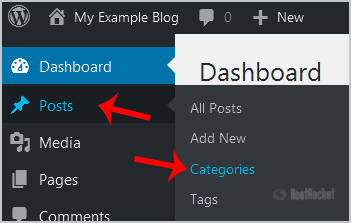
wp-dashboard-category-option.gif

Enter the following details in "Add New Category":
Name: Enter your category name such as "Computer".
Slug: Enter a slug name or leave this as it is.
Parent: Leave this to None or should you select a category, it will become a sub-category of your selected category and the browser will show a URL like example.com/technology/pc
Description: You can leave this as it is.

Now click on the "Add New Category" button.
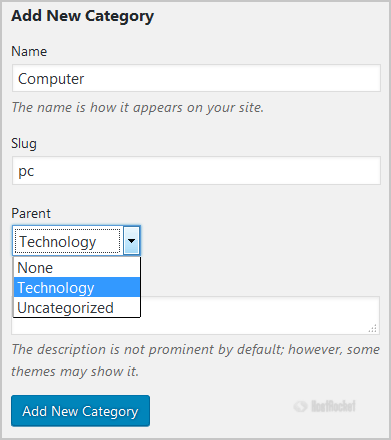
wp-category-filling.gif

  • 0 Utilizadores acharam útil
Esta resposta foi útil?

Artigos Relacionados

WordPress Form Mail via SMTP

WordPress Contact Form Mail via SMTP  Default WordPress settings use phpMail, an older...

utf8mb4 requires a newer client library error

While checking the WordPress ‘Site Health’ status page, you may see ‘utf8mb4 requires a newer...

WordPress Resources

Getting StartedWordPress Codex - New To WordPress - Where to StartWordPress Codex - First Steps...

Optimizing WordPress Sites

For a more general information on shared hosting resource limits, please refer to the following...

What Should I Do If I Receive a ‘Resource Limits Reached’ Error?

Why are there limits in place?Resource limits on shared servers are set and enforced with...