
How to update your cPanel Contact Information or receive a notification on reaching quota limit?

If you want to receive notification on reaching your disk quota, bandwidth usage limit, reaching email disk quota or want to update your cPanel contact information, follow these steps.

1. Log into your cPanel account.
2. In the "Preferences" section, click on "Contact Information" Icon.
 

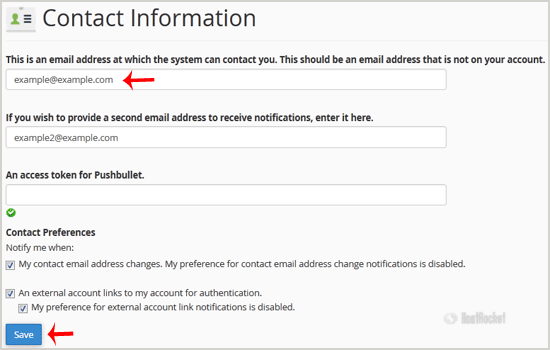
3. You should see an input box under the line that says "This is an email address at which the system can contact you. This should be an email address that is not on your account." This should be an email address that is not on your account if you have one. Update your existing email address or add your secondary email address in the second email input box.

4. Click on the "Save" button.
  • 0 Utenti hanno trovato utile questa risposta
Hai trovato utile questa risposta?

Articoli Correlati

How to edit or remove CNAME Record in cPanel using the DNS Zone Editor?

You can edit or remove CNAME Record from cPanel using the cPanel DNS Zone Editor which allows you...

How to Edit or Delete Cronjob via cPanel?

How to Edit Cronjob?1. Log into your cPanel account.2. In the "Advanced" section, click on "Cron...

How Do I Use File Manager?

You can use File Manager to upload, remove, move, view, and edit files for your website. You can...

How to create Cronjob via cPanel?

1. Log into your cPanel account.2. In the "Advanced" section, click on "Cron Jobs" Icon. 3. Under...

How to Update a Cronjob E-mail Address?

If you want to receive a cronjob error or notification, you can update your e-mail address from...