
How to Change cPanel Style/Theme?

Switching over to another cPanel theme with a different style is easy and there are two ways to do so.

First method: Paper Lantern Theme.
1. Log into your cPanel account.
2. In the "Preferences" section, click on the "Change Style" Icon.

 

3. You will see a lot of themes on the themes page. Just select the one you like and click on "Apply".
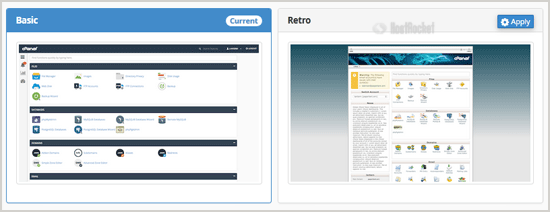

Second method: Change the theme instantly (Retro X3 Theme Only)
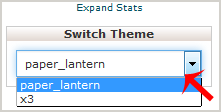
1. We assume you are already logged into your cPanel account. In your cPanel account near the left side of the page you should see a "Switch Theme" option with drop-down menu.

2. Choose your favorite theme from the drop-down menu and it will apply automatically.
  • 0 Users Found This Useful
Was this answer helpful?

Related Articles

How do I create Subdomains?

To create a subdomain, log into your cPanel account and click on the Subdomains icon. Specify the...

How to add CNAME Record in cPanel using the DNS Zone Editor?

CNAME records are referred to as alias records since they map an alias to its canonical name. You...

How to create Cronjob via cPanel?

1. Log into your cPanel account.2. In the "Advanced" section, click on "Cron Jobs" Icon. 3. Under...

Accessing your cPanel/Control Panel

The easiest method to access your accounts cPanel is to first login to the client area here:...

How to update your cPanel Contact Information or receive a notification on reaching quota limit?

If you want to receive notification on reaching your disk quota, bandwidth usage limit, reaching...