
How to Change Language of your cPanel?

cPanel supports many languages, and if you want to change your cPanel language to your native language, you should follow this tutorial.

1. Log into your cPanel account.
2. In the "Preferences" section, click on "Change Language" Icon.


3. From the cPanel Language Configuration Page, chose your language from the dropdown menu and then click on the "Change" button.
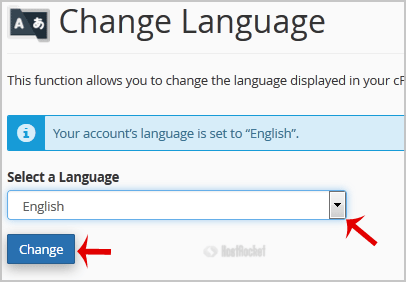

Your cPanel language has been successfully changed.


  • 0 Корисниците го најдоа ова како корисно
Дали Ви помогна овој одговор?

Понудени резултати

How do I create Subdomains?

To create a subdomain, log into your cPanel account and click on the Subdomains icon. Specify the...

How do I add an Addon Domain?

To add another domain to your hosting package, log into your cPanel account and click on the...

How to Edit file in the cPanel File Manager?

1. Log into your cPanel account.2. In the "Files" section, click on "File Manger" Icon. 3. cPanel...

cPanel User Guide

The cPanel User documentation can be found here:cPanel DocumentationcPanel also has a YouTube...

How to upload files via the cPanel FileManager?

If you don't want to use a 3rd party FTP Software, you can use the cPanel's built-in File...