
How to Change Language of your cPanel?

cPanel supports many languages, and if you want to change your cPanel language to your native language, you should follow this tutorial.

1. Log into your cPanel account.
2. In the "Preferences" section, click on "Change Language" Icon.


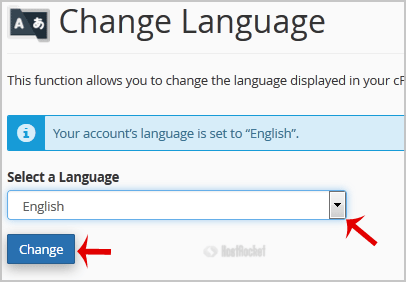
3. From the cPanel Language Configuration Page, chose your language from the dropdown menu and then click on the "Change" button.

Your cPanel language has been successfully changed.


  • 0 användare blev hjälpta av detta svar
Hjälpte svaret dig?

Relaterade artiklar

How to upload files via the cPanel FileManager?

If you don't want to use a 3rd party FTP Software, you can use the cPanel's built-in File...

How to add CNAME Record in cPanel using the DNS Zone Editor?

CNAME records are referred to as alias records since they map an alias to its canonical name. You...

How do I reset my control panel password?

If you need to reset your cPanel, and/or your DirectAdmin password, this can be done in your...

How to edit or remove CNAME Record in cPanel using the DNS Zone Editor?

You can edit or remove CNAME Record from cPanel using the cPanel DNS Zone Editor which allows you...

Accessing your cPanel/Control Panel

The easiest method to access your accounts cPanel is to first login to the client area here:...