
How to check disk usage of directory and bandwidth usage?

If you are receiving a disk space usage warning and don't know which folder is using too much space from cPanel.

1. Log into your cPanel account.
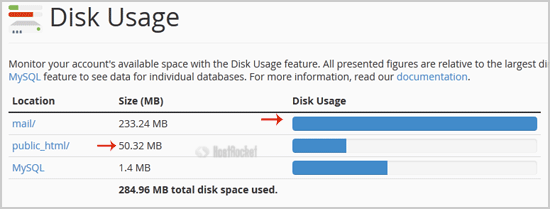
2. In the "Files" section, click on "Disk Space Usage" Icon.

 

3. In Disk Space Usage area you can see which folder/directory is using too much space and you can even check the disk usage of MySQL.


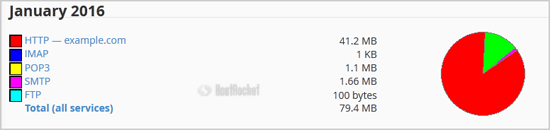
How to check Bandwidth Usage?
1. In the "Metrics" section, click on "Bandwidth" Icon.


2. Now you can see bandwidth usage of your domain.


How to check the usage of bandwidth, email accounts, mysql, etc from a single place?
1. Go to your cPanel's main page.
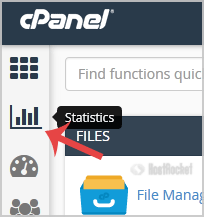
2. On the left side of the cPanel, click on the "Statistics" icon. It will show the total bandwidth usage, mysql, email account limit, etc.
  • 0 Kunder som kunne bruge dette svar
Hjalp dette svar dig?

Relaterede artikler

How to Access cPanel Web Disk?

You can use cPanel login details to access your Web Disk and it supports various operating...

How to Edit file in the cPanel File Manager?

1. Log into your cPanel account.2. In the "Files" section, click on "File Manger" Icon. 3. cPanel...

How do I reset my control panel password?

If you need to reset your cPanel, and/or your DirectAdmin password, this can be done in your...

How to add a MX Record in cPanel using DNS Zone Editor?

A mail exchanger record (MX record) is a type of resource record in the Domain Name System that...

How to create a new folder or files in the cPanel File Manager?

1. Log into your cPanel account.2. In the "Files" section, click on the "File Manger" Icon. 3....