2. In the "Databases" section, click on the "MySQL Databases" icon.

3. In "New Database: Username_" field enter a name for the new database you wish to create in the text field.
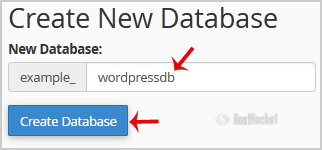
4. Click on the "Create Database" button.


1. Log into your cPanel account.2. In the "Databases" section, click on "phpMyAdmin" Icon. 3. In...
To connect to your MySQL database remotely, you will need to login into your control panel and go...
1. Log into your cPanel account.2. In the "Databases" section, click on "phpMyAdmin" Icon. 3. In...
1. Log into your cPanel account.2. In the "Databases" section, click on the "MySQL Databases"...
1. Log into your cPanel account.2. In the "Databases" section, click on the "MySQL Databases"...
