
Delete a Database in cPanel

1. Log into your cPanel account.
2. In the "Databases" section, click on the "MySQL Databases" Icon.

 

3. Under "Current Databases" you can see a list of all your databases. Locate the database that you wish to remove and then click on the "Delete" icon.
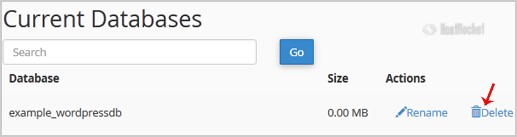

4. Click on the "Delete Database" button.

5. When you see a warning, click on the "Delete Database" button.

  • 0 Users Found This Useful
這篇文章有幫助嗎?

相關文章

How to optimize database via phpMyAdmin in cPanel?

1. Log into your cPanel account.2. In the "Databases" section, click on "phpMyAdmin" Icon. 3. In...

How do I create a database in cPanel?

1. Log into your cPanel account.2. In the "Databases" section, click on the "MySQL Databases"...

How do I optimize database tables in PHPMyAdmin?

To optimize database tables in phpMyAdmin, please use the following process: Login to your...

How to edit database table via phpMyAdmin in cPanel?

1. Log into your cPanel account.2. In the "Databases" section, click on "phpMyAdmin" Icon. 3. In...

How to Repair database via phpMyAdmin in cPanel?

1. Log into your cPanel account.2. In the "Databases" section, click on "phpMyAdmin" Icon. 3. In...