
How Do I Create a Subdomain in cPanel?

1. Log into your cPanel account.

2. In the "Domains" section, click on the "Subdomains" icon.


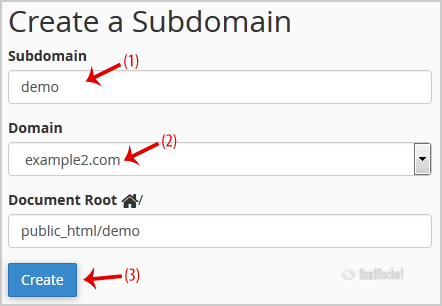
3. Under "Create a Subdomain" in the "Subdomain" field, enter your subdomain name. For example, for "demo.example2.com", enter "demo" (without the quotation marks). If you have more than one domain, select the appropriate domain from the dropdown list.

4. Click on the "Create" button.

  • 0 کاربر این را مفید یافتند
آیا این پاسخ به شما کمک کرد؟

مقالات مربوطه

How Do I Remove a Parked Domain in cPanel?

1. Log into your cPanel account.2. In the "Domains" section, click on the "Aliases" icon. 3....

How Do I Redirect a Subdomain to an External URL?

1. Log into your cPanel account.2. In the "Domains" section, click on "Subdomains" icon.3. Under...

How Do I Remove a Subdomain in cPanel?

1. Log into your cPanel account.2. In the "Domains" section, click on the "Subdomains" icon. 3....

How Do I Park a Domain in cPanel?

1. Log into your cPanel account.2. In the "Domains" section, click on the "Aliases" icon. 3....

How Do I Redirect My Website to a Different Page or External Domain?

1. Log into your cPanel account.2. In the "Domains" section, click on the "Redirects" icon. 3....