
How to remove sample comments, posts on a new WordPress blog?

If you installed a fresh WordPress blog system on your website ,before writing new posts, you will need to remove the sample comments, blog posts, etc. This can be done in the following way:


1. Login to your WordPress admin dashboard.
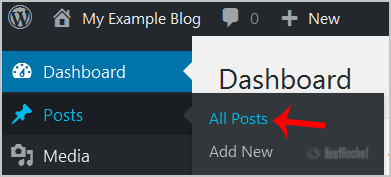
2. Under Dashboard Menu, hover your mouse on Posts and click on "All Posts".


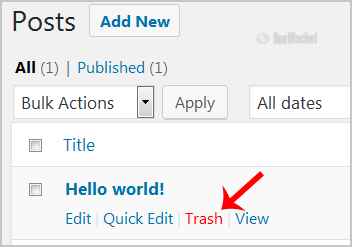
3. Hover your mouse on the "Hello World" post and the "Trash" option will appear. Click it to remove the post.


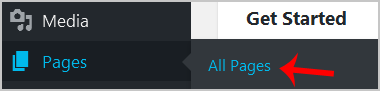
4. Now do the same with the sample page by pointing your mouse on "Page" in the Dashboard menu and then choosing on "All Pages".


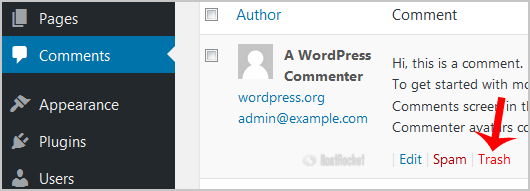
5. Choose "Comments" from the dashboard and then the "Trash" option will appear. Now click it.

After you take these steps, your blog will be clean, without sample posts and comments, and you can start blogging.

  • 0 Els usuaris han Trobat Això Útil
Ha estat útil la resposta?

Articles Relacionats

Accessing Your WordPress Dashboard

The URL for your WordPress Dashboard, by default, is example.com/wp-admin or...

How to start writing your first blog post in WordPress?

1. Login to your WordPress admin dashboard.2. Under the dashboard menu, hover your mouse on Posts...

What Should I Do If I Receive a ‘Resource Limits Reached’ Error?

Why are there limits in place?Resource limits on shared servers are set and enforced with...

How to add a new category in WordPress?

1. Login to your WordPress admin dashboard.2. Under the dashboard menu, hover your mouse on Posts...

Compromised Wordpress Cleanup and Recovery

Our shared servers employ an extensive set of security modules to protect accounts from...