
How to add A Record in cPanel using DNS Zone Editor?


A Record is a DNS record and is used to point a domain or subdomain to an IP address. You can add "A Record" using the cPanel™s Zone Editor option.


1. Log into your cPanel account. (eg: www.example.com/cPanel )
2. In the "Domains" section, click on the "Zone Editor" Icon.



Under "Domains", you can see many options below the "Actions" text.
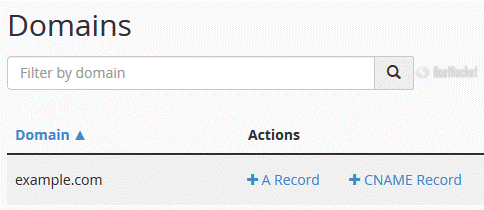


3. Click on "A Record" and a small window will pop open. Enter the required details in it.

Name: Enter the name you wish to add, for example, add "blog" and the cPanel will automatically add a domain name like blog.example.com.
Address: Enter the IP Address of the server.
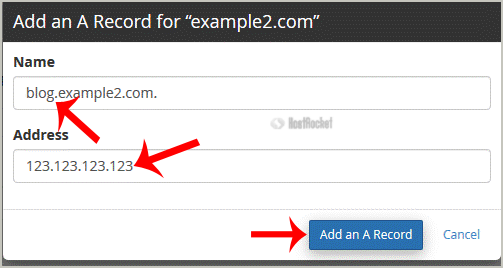
Now click on the "Add an A Record" button.


If the record is added successfully, you will see a success message. The DNS propagation can take up to 24 hours.

Note: It may take anywhere from 12 to 24 hours for the changes to take effect worldwide.
  • 0 Utenti hanno trovato utile questa risposta
Hai trovato utile questa risposta?

Articoli Correlati

How do I create Subdomains?

To create a subdomain, log into your cPanel account and click on the Subdomains icon. Specify the...

How to upload files via the cPanel FileManager?

If you don't want to use a 3rd party FTP Software, you can use the cPanel's built-in File...

How to Edit file in the cPanel File Manager?

1. Log into your cPanel account.2. In the "Files" section, click on "File Manger" Icon. 3. cPanel...

How to create Cronjob via cPanel?

1. Log into your cPanel account.2. In the "Advanced" section, click on "Cron Jobs" Icon. 3. Under...

How to add a MX Record in cPanel using DNS Zone Editor?

A mail exchanger record (MX record) is a type of resource record in the Domain Name System that...