
How to Edit "User Level Email Filter" in cPanel?

1. Log into your cPanel account.

2. In the "Email" section click on "Email Filters" Icon.



3.
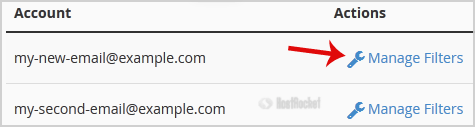
Under "Filters by Users" You can see all of your existing email accounts, Click on "Manage Filters" next to the appropriate one.


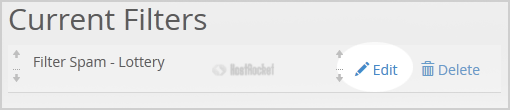
4. Under "Current Filters" You can see all of your existing filters, Click on "Edit" next to the appropriate one.

5. Make the desired changes to the filter.

6. Click on the "Save" Button.

  • 0 Користувачі, які знайшли це корисним
Ця відповідь Вам допомогла?

Схожі статті

How do I create an email account in cPanel?

1. Log into your cPanel account.2. In the "Email" section, click on the "Email Accounts" icon. 3....

How to Create "User Level Email Filter" in cPanel?

It is difficult to completely stop spam e-mail but you can filter it, discard it, deliver it to...

Email Deliverability - SPF/DKIM Records

cPanel now has an option to help automate email deliverability within the "Email Deliverability'...

How to Delete "User Level Email Filter" in cPanel?

1. Log into your cPanel account. 2. In the "Email" section, click on "Email Filters" Icon. 3....

How can I access my webmail?

To access your webmail, you'll need to go to the following...