
How do I create an email account in cPanel?

1. Log into your cPanel account.

2. In the "Email" section, click on the "Email Accounts" icon.


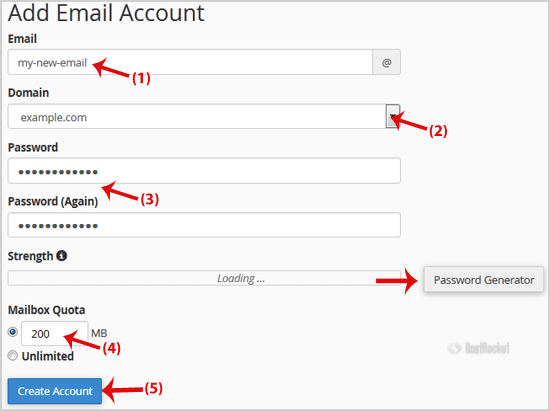
3. Enter the email address that you wish to create, such as "my-first-email". (If you manage more than one domain, select the appropriate domain from the menu.)

4. Enter your new password or use a password generator.

5. Change the quota or leave this as it is and then click on the "Create Account" button.

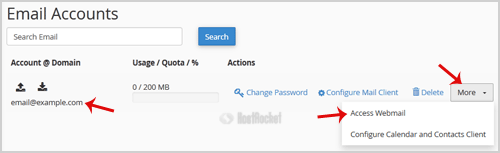
Once your email account has been created, it will appear under the "Account @ Domain" tab.

  • 1 משתמשים שמצאו מאמר זה מועיל
?האם התשובה שקיבלתם הייתה מועילה

מאמרים קשורים

What are auto responders and how do I create them?

An "auto responder" is an automated response to the sender. Creating an Auto Responder: Login...

How to Delete "User Level Email Filter" in cPanel?

1. Log into your cPanel account. 2. In the "Email" section, click on "Email Filters" Icon. 3....

How to Delete Account Level/Global Email Filter in cPanel?

1. Open "Account-Level Filtering" in your cPanel Account. 2. Under "Current Filters" you can see...

How to Edit "User Level Email Filter" in cPanel?

1. Log into your cPanel account. 2. In the "Email" section click on "Email Filters" Icon. 3....

Can email account users change their own passwords?

Yes. Users can change their passwords by logging into webmail. Before selecting a webmail...