
It is difficult to completely stop spam e-mail but you can filter it, discard it, deliver it to selected folder, etc.
How to Create User Level Email Filter?
1. Log into your cPanel account.
2. In the "Email" section, click on "Email Filters" Icon.

3. Under "Filters by Users", You can see all of your existing email accounts, Click on "Manage Filters" next to the appropriate one. 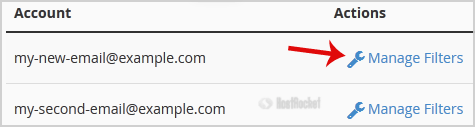
4. Click on the "Create a New Filter" button
5. Enter a name for the filter in the Filter Name text box.
6. In the rules of the filter you can filter e-mail by many options, and should you want to deal with e-mail which contains a word like "Lottery" or other words, then select "Contains" under the "Rules" list, select "Body" from the dropdown list and from the 2nd drop down list.
7. Under "Actions" list select "Discard Message"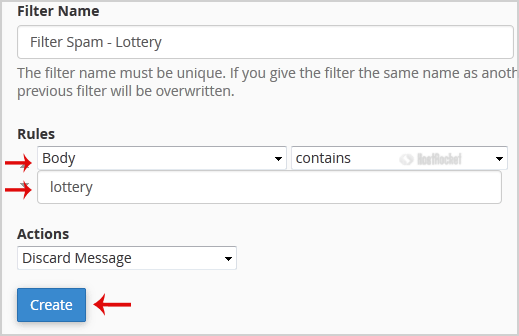
8. Now Click on the "Create" Button.
- 0 Utilizadores acharam útil
