
How to Delete Account Level/Global Email Filter in cPanel?

1. Open "Account-Level Filtering" in your cPanel Account.



2. Under "Current Filters" you can see all of your existing filters. Click on "Delete" next to the appropriate filter name.
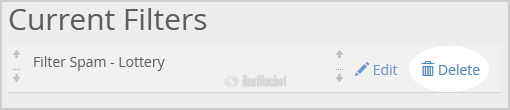

3. Click on the "Delete" button.

4. Now click on the "Delete Filter" button to remove your filter.

Account Level Filters would be deleted much in the same way. In Step 2, select the "Email Filters" Icon instead.

  • 0 Usuários acharam útil
Esta resposta lhe foi útil?

Artigos Relacionados

How to create an E-mail Autoresponder when you are unavailable or on vacation?

If you are going for a holiday or will be unavailable for few days or a month, you can create an...

Creating Email Accounts

When a new account is initially created, the only email account will be the default account. For...

How Do I Change My Email Account's Password?

1. Log into your cPanel Mail Administration account.2. In the "Email" section click on the "Email...

How do I change my mail administration password?

If you need to reset your mail administration password, this can be done in your client area...

Email Deliverability - SPF/DKIM Records

cPanel now has an option to help automate email deliverability within the "Email Deliverability'...